 Skip to content
Why is my Jio Lottery login not working?
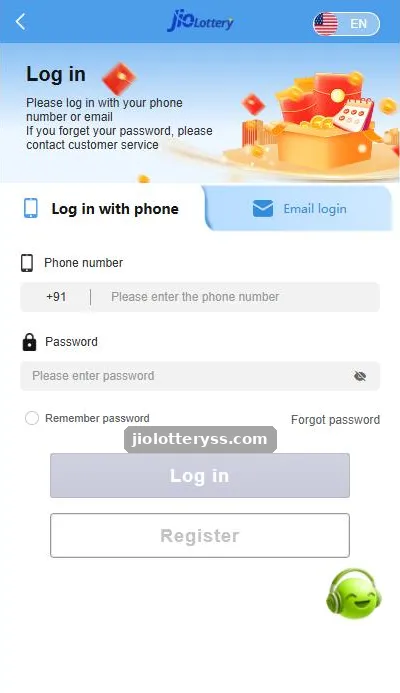
The login screen has two separate tabs, “Log in with phone” and “Email login”, and an account created with one will not open on the other. That single detail explains a large share of “account not found” errors. Other causes are much more ordinary: a mistyped digit, caps lock, a password changed on a second phone, or a bookmark that points to an address the platform no longer uses.
Work through the table from top to bottom. Each step takes under a minute, and most players are back in before they reach the end.
| Symptom | Likely cause | Fix |
|---|---|---|
| “Account does not exist” | Wrong tab or wrong identifier | Switch between phone and email tabs |
| “Incorrect password” | Caps lock, autofill or an old password | Type it manually; use Forgot password |
| Nothing happens on tap | Weak network or blocked script | Switch Wi-Fi to mobile data and reload |
| Page loads forever | Old cache or outdated bookmark | Clear site data, open a fresh link |
| Logged out repeatedly | “Remember password” unticked or private mode | Use a normal tab on your own phone |
| App opens but stays blank | Old app build | Reinstall from the site’s Download button |
How do I fix the +91 phone number error?
Keep the preset +91 country code and type only your 10-digit mobile number, with no leading 0, no spaces and no second +91. Pasting a number copied from WhatsApp often brings hidden spaces or the country code twice, which the form treats as a different number.
What if I see a different-looking login page?
Stop before typing anything. A copied login page can look almost identical and exists only to collect passwords. Close it, open the platform yourself or use the Login button on this site, and compare the address bar. Never log in from a link sent by a stranger, even if it promises a bonus.
When should I contact customer service?
If you have tried both tabs, reset your password and cleared the cache, contact support from inside the app. The login screen itself says to contact customer service if you forget your password. Have your registered number or email ready, and never share your OTP or password in chat. Real support staff do not need them.
For the full sign-in walkthrough, read our Jio Lottery login guide. If the problem is the SMS code, see Jio Lottery OTP not received.
Jio Lottery Login Problem FAQs
Why does Jio Lottery say my account does not exist?
You are probably on the wrong tab. Accounts made with a phone number open on “Log in with phone”; email accounts open on “Email login”.
Can too many wrong passwords lock my Jio Lottery account?
Repeated failed attempts can trigger temporary security limits on many platforms. Stop guessing and use Forgot password instead.
Does clearing the cache delete my Jio Lottery balance?
No. Your balance is stored on the platform account, not in the browser. Clearing cache only signs you out of that browser.
Is it safe to log in from a link sent on Telegram?
No. Open the site yourself or use a trusted button. Links from strangers are the main way passwords get stolen.
Key takeaways
- Check the phone vs email tab first.
- Type +91 numbers without spaces or a leading zero.
- Clear cache or reinstall if the screen stays blank.
- Contact in-app support only; never share an OTP.
Related Jio Lottery guides
- Jio Lottery login
- Jio Lottery Forgot Password
- Jio Lottery OTP Not Received
- Jio Lottery Email Login
- Jio Lottery (homepage overview)
- All Jio Lottery guides
