 Skip to content
How do I reset my Jio Lottery password?
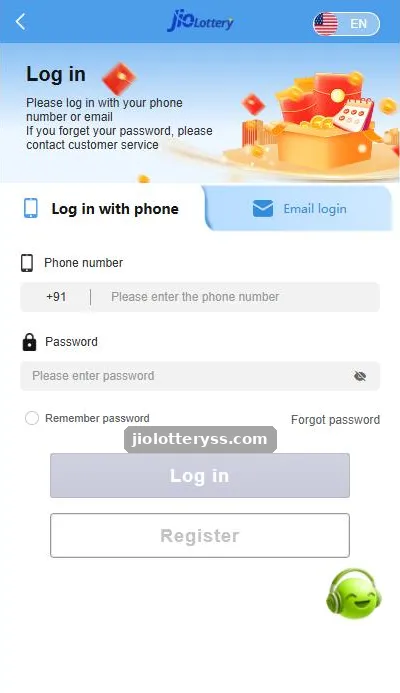
- Open the Jio Lottery login screen.
- Choose the tab you registered with: phone or email.
- Tap Forgot password below the password box.
- Enter your registered number or email and complete the verification shown.
- Set a new password, confirm it, and log in again.
Use a password you have never used on another site. Gaming accounts are a common target for password-reuse attacks, where criminals try leaked passwords from other services.
What if I no longer have the registered phone number?
If the SIM is lost or changed, an SMS-based reset cannot reach you. In that case contact the in-app customer service and explain the situation. Be ready to prove the account is yours, for example with the registered number, recent deposit references or account details only you would know. Never send photos of your OTP or bank PIN.
How do I choose a strong new password?
| Do | Avoid |
|---|---|
| At least 10 characters mixing letters, numbers and a symbol | Your name, birth date or phone number |
| A phrase only you know, like three random words | The same password you use for email or UPI |
| A password manager on your own phone | Writing it in WhatsApp notes or sharing it with an “agent” |
Should I tick “Remember password” afterwards?
Only on a phone that no one else uses. On a shared or family phone, leave it unticked so the next person cannot open your wallet. If you think someone else knows your password, change it at once and review recent activity in your account.
Still stuck? Our login problem guide covers every other sign-in error, and the Jio Lottery customer care page explains how to reach support safely.
Jio Lottery Forgot Password FAQs
Where is the Forgot password link in Jio Lottery?
It sits on the login screen next to the “Remember password” tickbox, under the password field.
Will resetting my password change my balance?
No. Only the password changes. Your wallet, history and invite links stay the same.
Can customer service tell me my old password?
No legitimate support team can see or send your password. They help you set a new one after verification.
Someone asked for my OTP to “reset” my password. Is that normal?
No. That is a takeover attempt. Never share an OTP with anyone, including people claiming to be support.
Key takeaways
- Use Forgot password on the login screen.
- Lost SIM? Contact in-app customer service.
- Pick a unique password and avoid reuse.
- Nobody genuine will ask for your OTP.
Related Jio Lottery guides
- Jio Lottery login
- Jio Lottery Login Problem
- Jio Lottery Customer Care
- Jio Lottery account security
- Jio Lottery game guide (homepage overview)
- All Jio Lottery guides
